Las mejores herramientas manuales para la gestión de resúmenes y revisión por pares en 2026

Paige Watson
Published on 12 de abril de 2026Incluso en 2026, muchas conferencias académicas y revistas científicas dependen de herramientas manuales para gestionar el envío de resúmenes y la revisión por pares. Aunque existen plataformas avanzadas, los flujos de trabajo manuales creados con herramientas como Google Forms, Google Sheets y Google Drive se siguen utilizando ampliamente, especialmente en conferencias pequeñas y medianas.
La clave no es solo usar estas herramientas, sino utilizarlas correctamente. En esta guía, desglosamos las mejores herramientas manuales, cómo usarlas paso a paso y cómo estructurar un flujo de trabajo que realmente funcione.
Resumen del flujo de trabajo manual
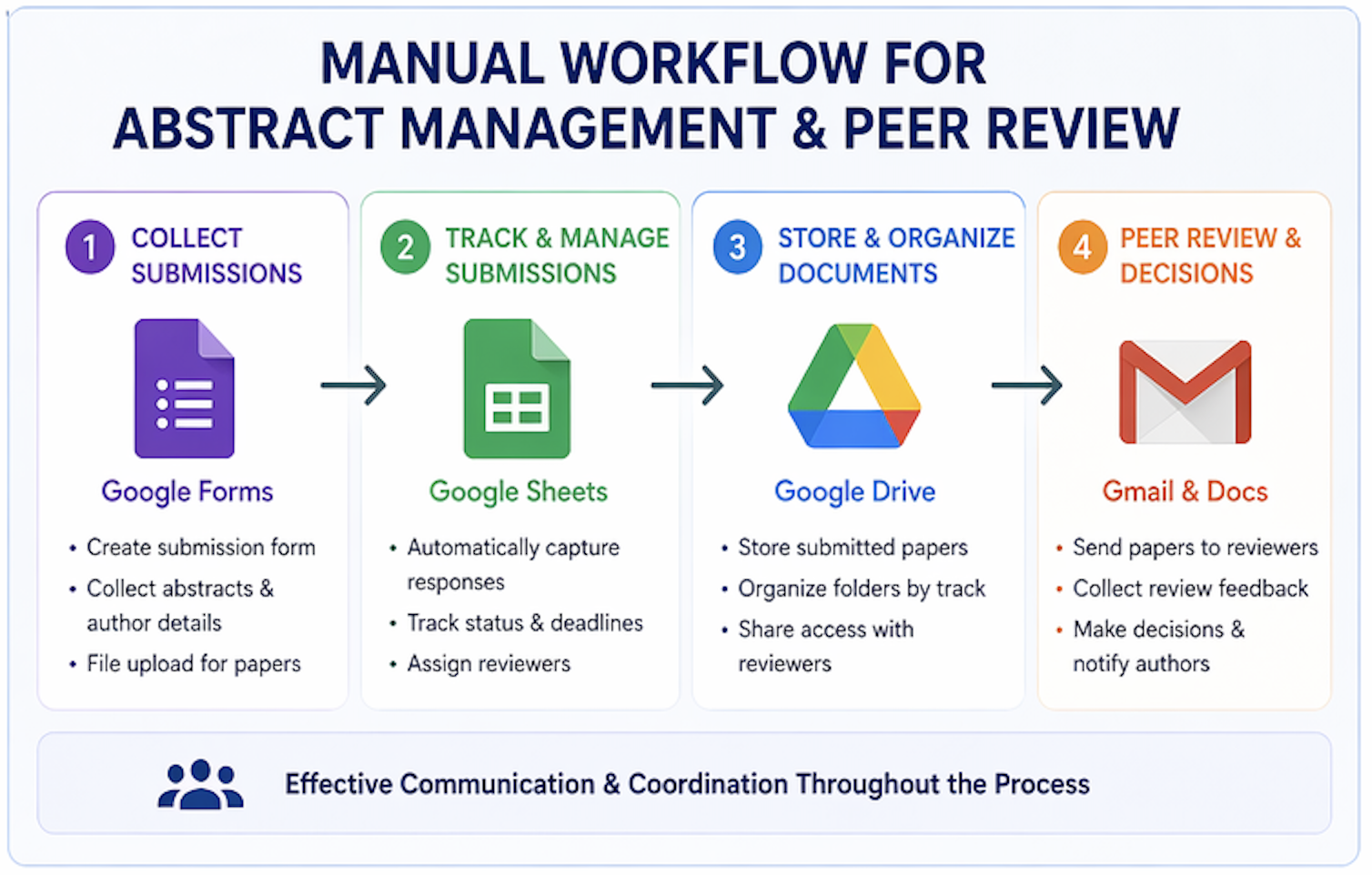
Un flujo de trabajo manual típico utiliza múltiples herramientas que funcionan de manera conjunta:
- Google Forms → Recopilar los envíos
- Google Sheets → Seguir los artículos y su estado
- Google Drive → Almacenar los documentos
- Correo electrónico (Gmail/Outlook) → Comunicarse con autores y revisores
Cada herramienta desempeña un papel fundamental en la gestión del ciclo de vida completo de los envíos y las revisiones.
Paso 1: Recopilar resúmenes con Google Forms
Google Forms es una de las mejores herramientas gratuitas para recopilar el envío de resúmenes.
- Cree campos para el título, el resumen (abstract) y las palabras clave
- Añada los detalles del autor (nombre, correo electrónico, afiliación)
- Utilice la opción de carga de archivos para el envío de artículos
Cómo utilizarlo:
- Vaya a Google Forms
- Cree un nuevo formulario
- Añada campos estructurados para el envío
- Vincule las respuestas a Google Sheets
Esto crea un sistema centralizado donde todos los envíos se registran de forma automática.
Paso 2: Realizar el seguimiento de los envíos con Google Sheets
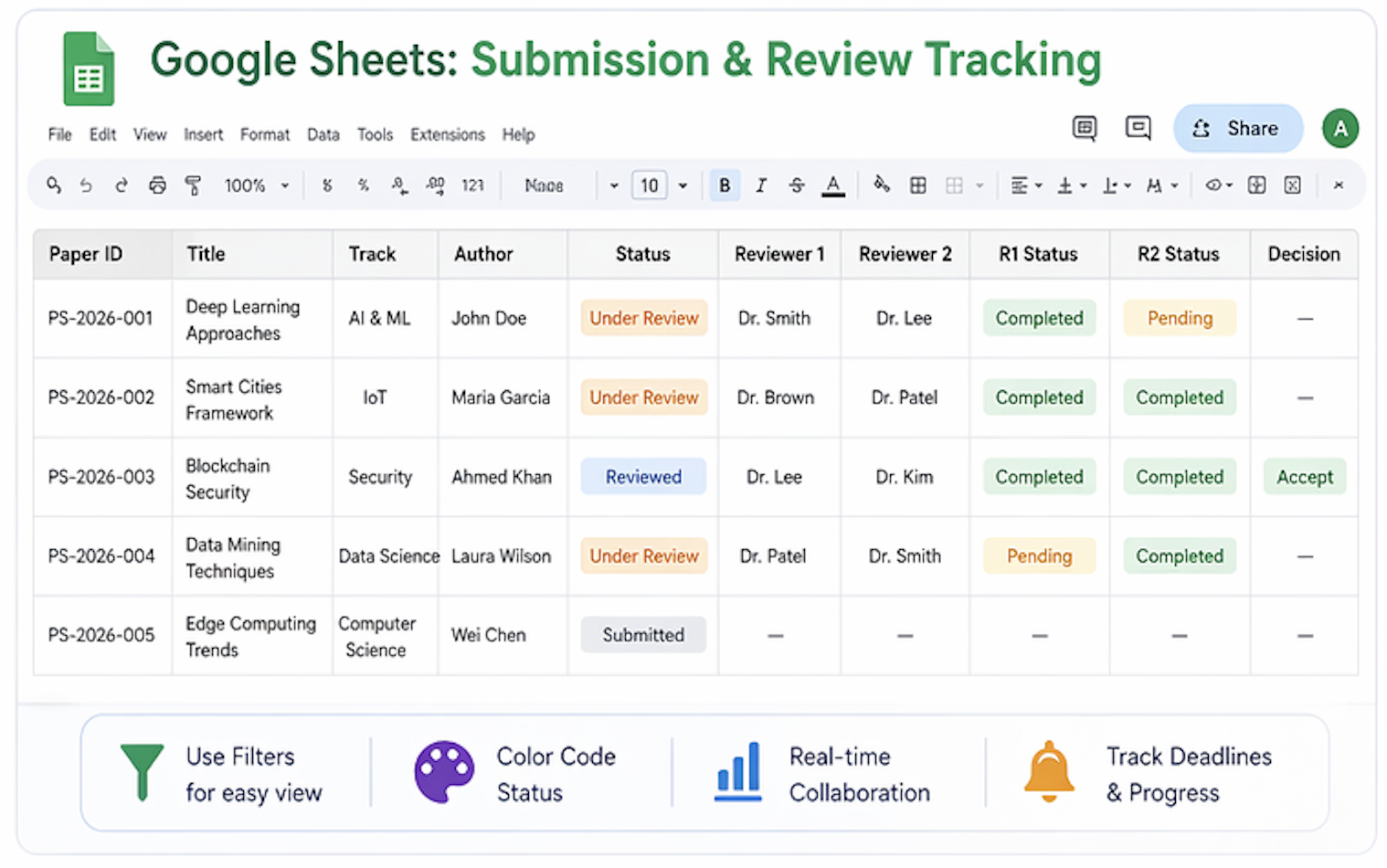
Google Sheets actúa como el centro de control de todo el flujo de trabajo de su conferencia.
- Siga el estado del envío (enviado, en revisión, aceptado)
- Asigne revisores de forma manual
- Monitoree los plazos de entrega y el progreso
Cómo utilizarlo:
- Vincule las respuestas de Google Forms a Sheets
- Añada columnas para la asignación de revisores
- Utilice filtros y códigos de colores para el seguimiento
Esto ayuda a los organizadores a mantener la visibilidad sobre todas las propuestas recibidas.
Paso 3: Almacenar los artículos con Google Drive
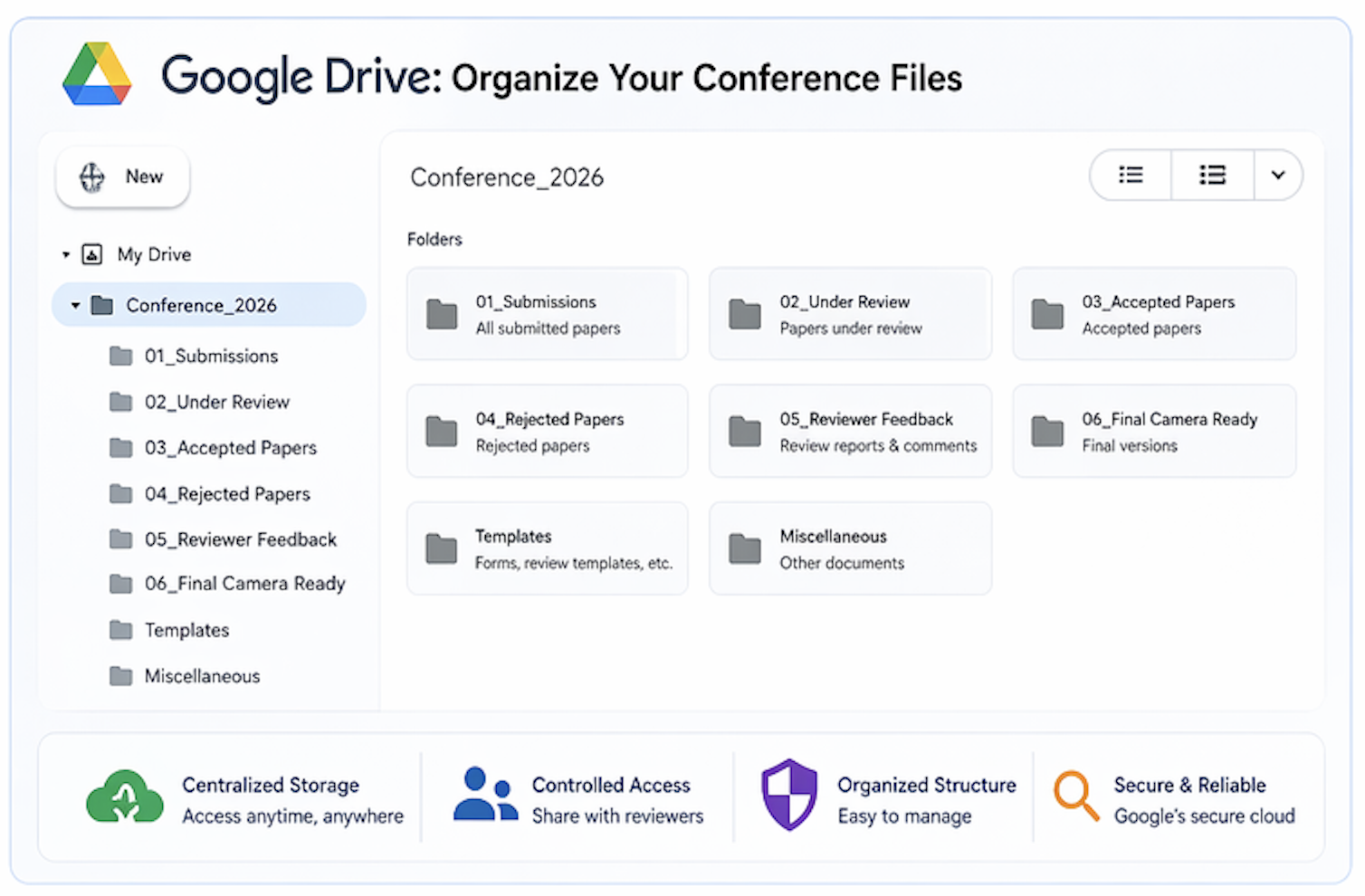
Google Drive es ideal para almacenar y organizar los artículos enviados.
- Cree carpetas por áreas temáticas o tópicos
- Almacene los PDFs y documentos enviados
- Comparta el acceso con los revisores
Cómo utilizarlo:
- Cree una carpeta principal para la conferencia
- Organice subcarpetas por categorías
- Utilice convenciones de nomenclatura consistentes
Una organización adecuada evita confusiones y pérdidas de datos.
Paso 4: Gestionar la revisión por pares mediante correo electrónico y Docs
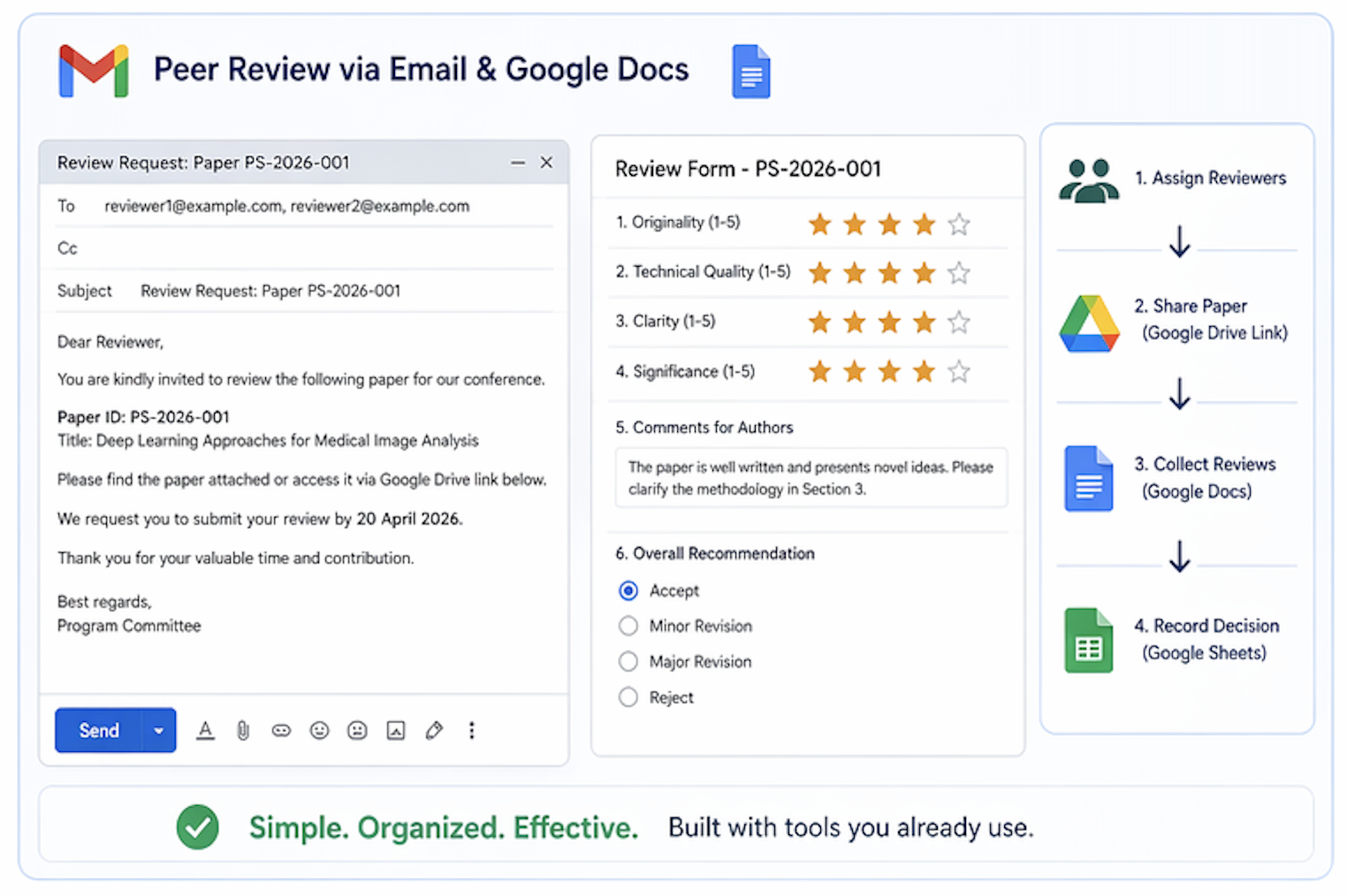
La revisión por pares se gestiona típicamente de forma manual utilizando el correo electrónico y documentos compartidos.
- Envíe los artículos a los revisores por correo electrónico
- Recopile los comentarios utilizando Google Docs o Word
- Actualice el estado de la revisión en Sheets
Cómo utilizarlo:
- Asigne revisores manualmente en la hoja de cálculo
- Envíe por correo los enlaces de los artículos desde Google Drive
- Recopile y consolide los comentarios recibidos
Una comunicación clara es fundamental para evitar retrasos.
Ventajas de las herramientas manuales
- Herramientas gratuitas y accesibles
- Configuración flexible del flujo de trabajo
- Fácil de poner en marcha para conferencias pequeñas
Desafíos a considerar
- Coordinación lenta y laboriosa
- Asignación manual de revisores
- Alto riesgo de errores
- Difícil de escalar
Cuándo funcionan mejor las herramientas manuales
Las herramientas manuales son ideales para:
- Conferencias pequeñas
- Talleres (workshops) y eventos piloto
- Volúmenes limitados de envíos
Un enfoque mejor: migrar hacia plataformas integradas
Aunque las herramientas manuales pueden funcionar, gestionar múltiples sistemas desconectados se vuelve complejo a medida que las conferencias crecen. Aquí es donde las plataformas integradas como PeerSubmit ofrecen una ventaja significativa.
En lugar de utilizar múltiples herramientas independientes, PeerSubmit unifica todo en un solo lugar:
- Sistema centralizado de envío de artículos
- Recomendación de revisores impulsada por IA
- Gestión de resúmenes integrada
- Flujos de trabajo y seguimiento automatizados
- Gestión de envío de artículos
- Recomendación de revisores con IA
- Flujos de trabajo automatizados
- Seguimiento en tiempo real
Conclusiones finales
Las herramientas manuales como Google Forms, Sheets y Drive pueden respaldar eficazmente la gestión de resúmenes y la revisión por pares, siempre que se utilicen dentro de flujos de trabajo estructurados.
Sin embargo, a medida que las conferencias escalan, depender de múltiples herramientas se vuelve ineficiente y consume demasiado tiempo. Plataformas como PeerSubmit simplifican todo el proceso y logran que la revisión por pares sea hasta un 70% más rápida al eliminar la coordinación manual y automatizar los flujos de trabajo clave.
Comience a Gestionar su Conferencia: Desde el Envío hasta la Decisión
Únase a cientos de organizadores que confían en PeerSubmit para gestionar sus eventos académicos con eficiencia impulsada por IA y flujos de trabajo fluidos.
Sin tarjeta de crédito • Configuración en minutos
Guía profunda de herramientas manuales FAQs
Organice su Conferencia Sin Caos
Gestione envíos, revisión por pares, registros y flujos de trabajo—todo en una sola plataforma diseñada para eventos académicos.
Únase a cientos de conferencias académicas que ya utilizan PeerSubmitSin tarjeta de crédito • Configuración en minutos