¿Cómo pueden los organizadores ver los informes de campaña?

Paige Watson
Updated on 10 de marzo de 2026PeerSubmit provides campaign reports to help organizers analyze the performance of their email campaigns. These reports allow you to track delivery status, recipient engagement, and overall effectiveness of your communication.
By reviewing campaign reports, organizers can understand how their emails are performing and optimize future communications with authors, reviewers, and conference participants.
Step 1: Navigate to Email Campaigns
- Log in to your PeerSubmit organizer dashboard.
- From the left sidebar menu, click Email Campaigns.
- Select My Campaigns to view your campaign list.
Step 2: Locate the Campaign
- Browse the list of campaigns.
- Find the campaign whose report you want to analyze.
- Click View Details next to the campaign.
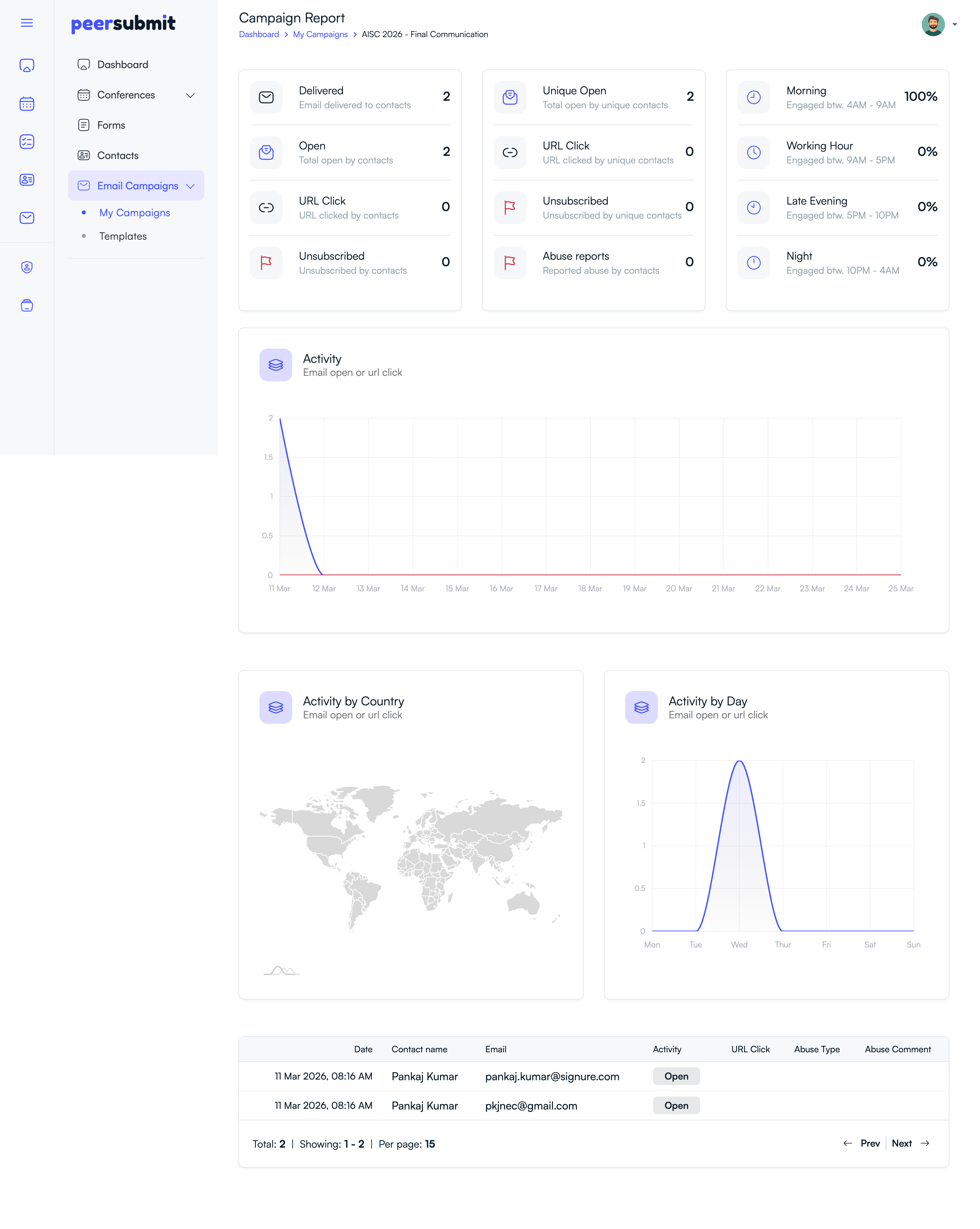
Step 3: View Campaign Statistics
The campaign report page displays key performance metrics.
- Delivered Emails: Number of emails successfully delivered.
- Open Rate: Number of recipients who opened the email.
- Click Activity: Links clicked within the email.
- Bounce Rate: Emails that could not be delivered.
Step 4: Review Contact-Level Details
- View the list of contacts who received the email.
- Check delivery status for each recipient.
- Identify bounced or failed email deliveries.
Benefits of Campaign Reports
- Understand how recipients interact with your emails.
- Improve email content and subject lines.
- Track communication effectiveness with conference participants.
- Identify delivery issues or invalid email addresses.
Campaign reports provide valuable insights that help organizers improve future email campaigns and maintain effective communication with their audience.
Related Articles
Comience a Gestionar su Conferencia: Desde el Envío hasta la Decisión
Únase a cientos de organizadores que confían en PeerSubmit para gestionar sus eventos académicos con eficiencia impulsada por IA y flujos de trabajo fluidos.
Sin tarjeta de crédito • Configuración en minutos
Organice su Conferencia Sin Caos
Gestione envíos, revisión por pares, registros y flujos de trabajo—todo en una sola plataforma diseñada para eventos académicos.
Únase a cientos de conferencias académicas que ya utilizan PeerSubmitSin tarjeta de crédito • Configuración en minutos