¿Cómo pueden los organizadores reordenar los campos?

Paige Watson
Updated on 10 de marzo de 2026PeerSubmit allows organizers to easily rearrange the order of form fields to improve the form structure and user experience. Reordering fields helps present questions in a logical flow and makes forms easier for participants to complete.
You can reorder fields directly from the form builder using a simple drag-and-drop interface.
Step 1: Open the Form Builder
To reorder fields, first open the form editor.
- Log in to your PeerSubmit organizer account.
- Navigate to the Forms section from the dashboard.
- Select the form you want to edit.
- Click Edit to open the form builder.
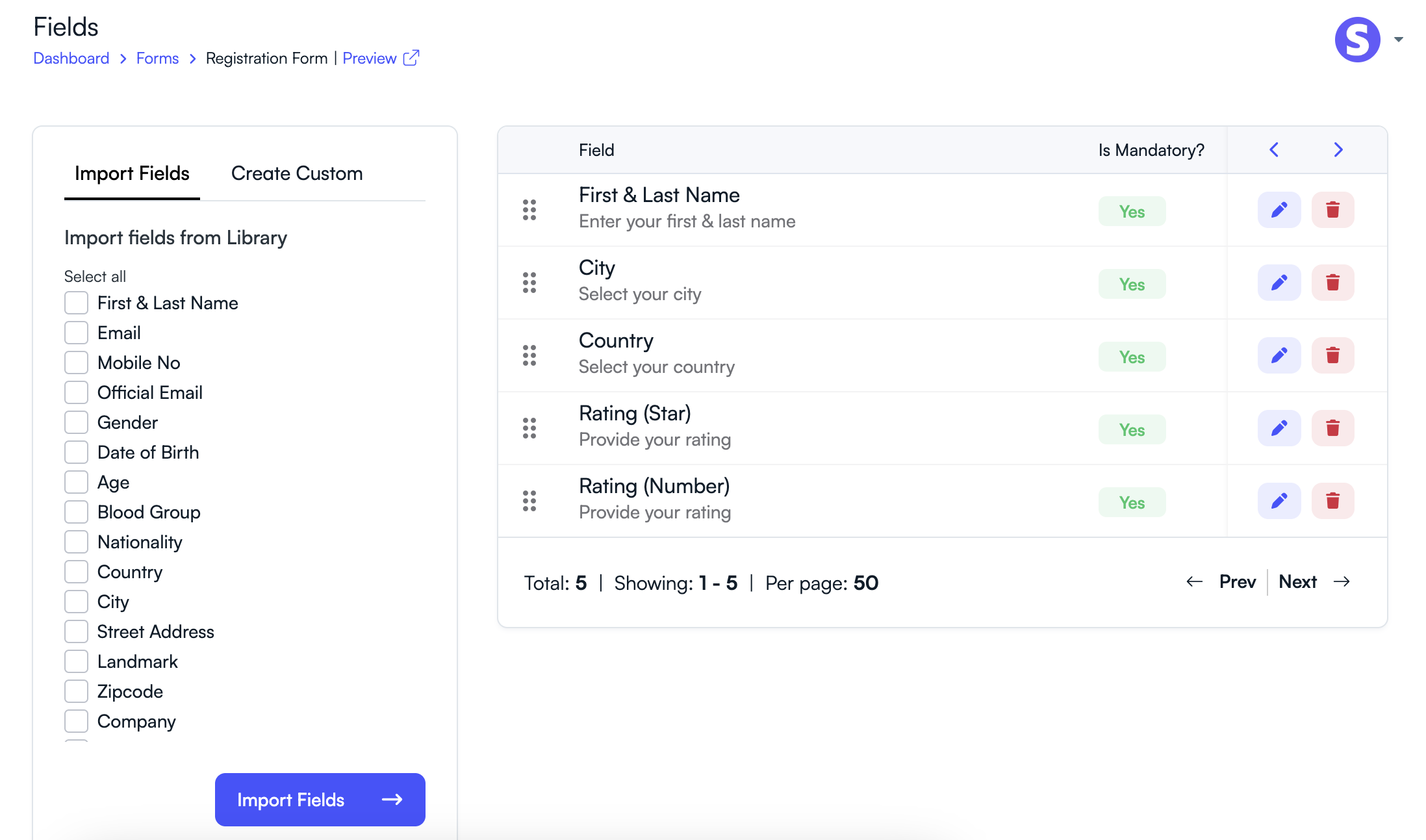
Step 2: Locate the Fields
Inside the form builder, all fields added to the form will appear in a list or layout.
- Review the current order of fields.
- Identify the field you want to move.
Step 3: Drag and Drop the Field
To change the position of a field:
- Click and hold the field using the drag handle or field area.
- Drag the field to the desired position.
- Release the field to place it in the new location.
Step 4: Save the Form
After arranging the fields in the correct order:
- Click Save or Update Form.
- The updated field order will be applied to the form.
Best Practices for Organizing Form Fields
- Place basic information fields (Name, Email) at the beginning.
- Group related questions together.
- Place optional or feedback questions toward the end.
- Keep the form short and easy to follow.
Properly organizing form fields improves the overall form experience and helps participants complete forms more efficiently.
Related Articles
Comience a Gestionar su Conferencia: Desde el Envío hasta la Decisión
Únase a cientos de organizadores que confían en PeerSubmit para gestionar sus eventos académicos con eficiencia impulsada por IA y flujos de trabajo fluidos.
Sin tarjeta de crédito • Configuración en minutos
Organice su Conferencia Sin Caos
Gestione envíos, revisión por pares, registros y flujos de trabajo—todo en una sola plataforma diseñada para eventos académicos.
Únase a cientos de conferencias académicas que ya utilizan PeerSubmitSin tarjeta de crédito • Configuración en minutos