Best Conference Registration Software in Mexico 2026

Paige Watson
Published on 17 September 2026The best conference registration software in Mexico in 2026 must work for the way your event collects money and confirms attendance. A university congress in Mexico City may sell student and presenter tickets in Mexican pesos, receive payments into an institutional account, and need to know exactly when each delegate's place is confirmed. An international conference may also need an online checkout for attendees abroad.
This guide compares registration platforms through that Mexico-specific lens: ticket categories, academic submissions, Spanish-language communication, payment flexibility, and the work of reconciling registrations. It is a separate buyer's guide from our global conference registration comparison.
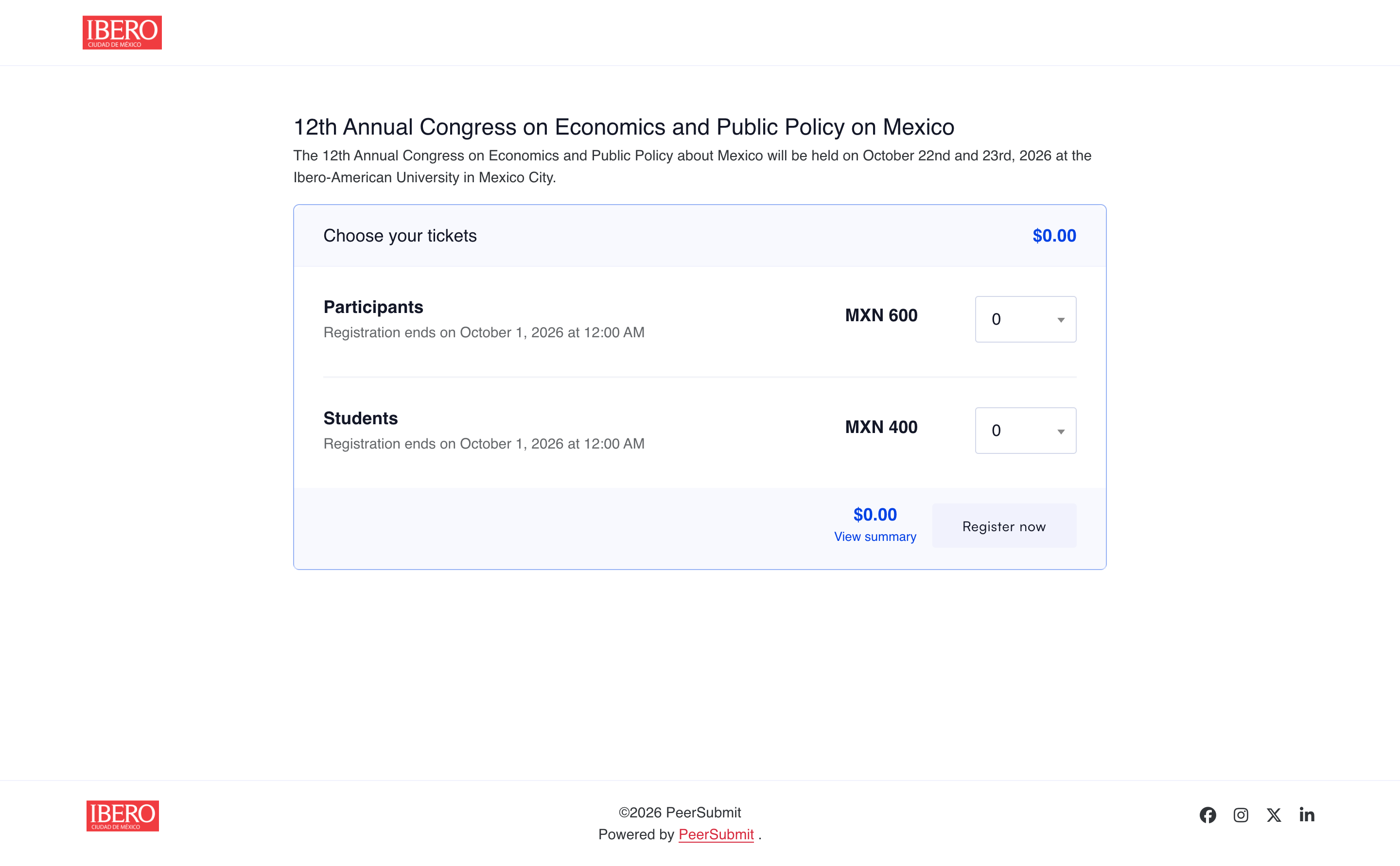
What Mexico-based conference organizers should check first
Before comparing feature lists, map the actual registration process. A conference registration platform in Mexico should make it clear who is paying, where the money goes, and when the attendee receives a confirmed place.
- MXN pricing: Can the event display ticket prices clearly in Mexican pesos and apply the right rate to students, presenters, members, and general delegates?
- Payment ownership: Can funds go through the institution's chosen online payment account or directly to the university or organizer under its own instructions?
- Payment status: Are unpaid, pending verification, and confirmed registrations distinguishable in the organizer dashboard?
- Academic workflow: Can the team connect accepted abstracts or papers with the people who must register to present?
- Attendee communication: Can organizers send clear instructions and confirmations to Spanish-speaking and international delegates?
Flexible Payment Collection
For many Mexican academic events, a single card checkout is too narrow. Institutions may have an approved bank account or procurement process, while other attendees prefer to pay online. The registration workflow should support both paths without treating a payment request as a completed ticket.
Online Payments
PeerSubmit lets organizers connect supported online payment methods. When an online payment succeeds, the platform can confirm the registration and send the payment confirmation automatically. The exact gateway, currency, and methods available depend on the organizer's connected account, so test a real MXN checkout before opening sales.
Offline / Direct Payments
PeerSubmit can show the organizer's payment instructions so an attendee pays directly to the university, institution, organizer, or designated merchant account. The payment request remains pending while the organizer verifies the transfer or other agreed payment. Once verified, the organizer confirms it in PeerSubmit; the registration is then confirmed and the ticket is released.
In Mexico, a direct bank transfer may be made through SPEI, the interbank transfer system operated by Banco de México. For that workflow, give the attendee a clear reference or order number and ask for a comprobante de pago if your finance team needs one. PeerSubmit's direct-payment path records an organizer-verified payment; it does not imply automatic SPEI reconciliation.
Best conference registration software in Mexico 2026: platforms to compare
| Platform | Best fit for a Mexico-based event | Payment question to ask |
|---|---|---|
| PeerSubmit | University and research conferences combining submissions, review, and registration | Which online gateway will you connect, or will your team verify direct payments? |
| Ex Ordo | Scholarly conferences tracking presenter and delegate payment | Which card and bank-transfer options are available for your organizer account? |
| ConfTool Pro | Events with detailed participant groups, discounts, and invoice rules | How will the team configure and reconcile online and manual payments? |
| Cvent | Large conferences with marketing, CRM, and on-site operations | Which payment service and registration modules are included in your proposal? |
| Whova | Events emphasizing ticketing, app engagement, badges, and check-in | What are the ticket and processing costs for the selected payment setup? |
These are fit-based recommendations, not claims that every provider offers every payment method in Mexico. Check the current contract, gateway eligibility, fees, and attendee experience for your institution.
1. PeerSubmit — for academic registration and direct-payment control
PeerSubmit connects abstract and paper submissions, peer review, ticket types, attendee forms, coupons, online payments, and organizer-confirmed direct payments. For a Mexican university, that means the committee can manage its academic program and delegate registration without rebuilding the event in a separate ticketing system.
Build tickets for each delegate group
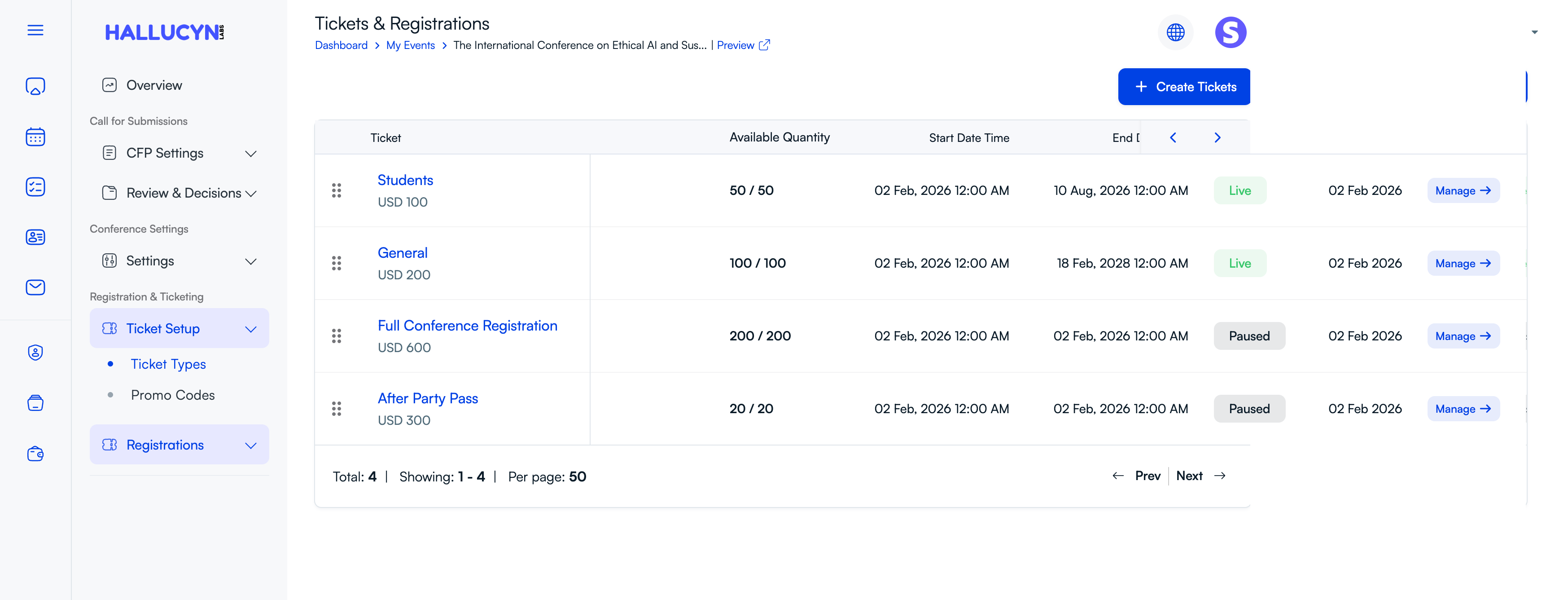
Create student, presenter, general, or full-conference tickets with their own prices and quantities. PeerSubmit's ticket screen displays the sales start and end times, remaining inventory, and live or paused status. Organizers can attach custom attendee forms to tickets to collect the details needed for badges, communications, or reporting. For a Mexico-based event, set the intended event currency and check the public page before sales open.
Control student and early-bird discounts
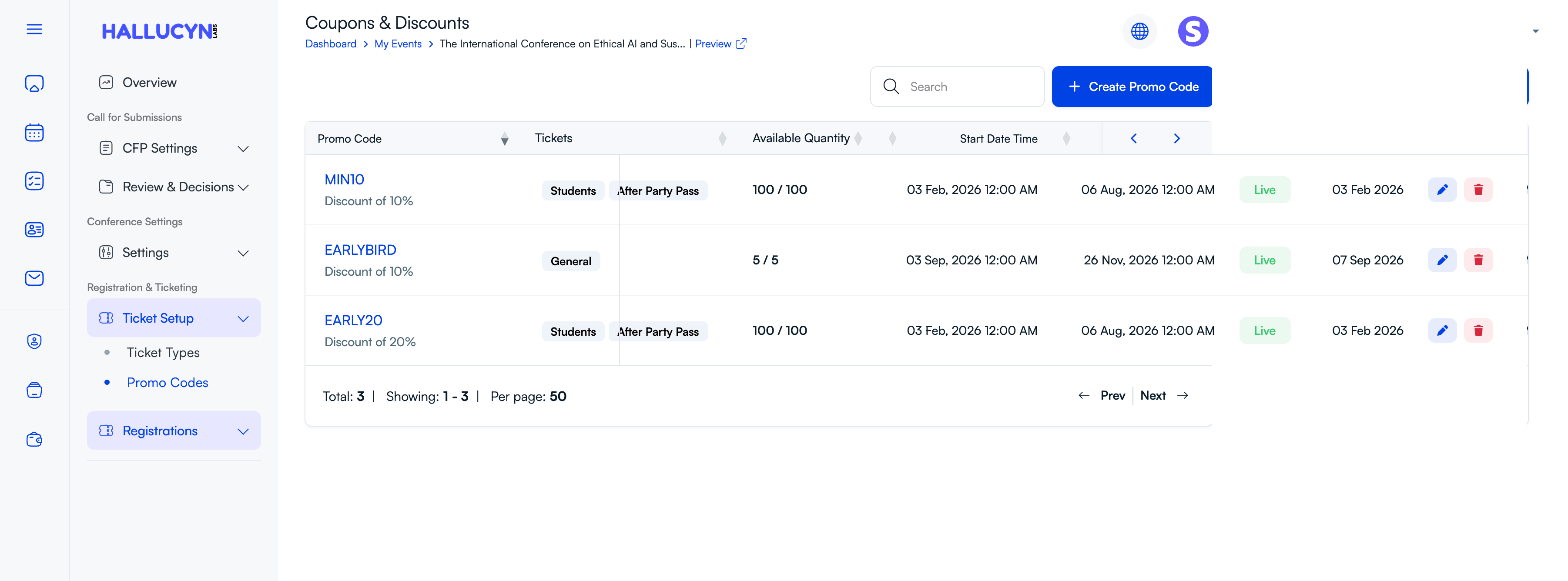
Promo codes can be assigned to selected ticket types with a defined discount, quantity, and validity period. That lets a committee offer a student code, a limited early-bird rate, or a separate workshop promotion without changing every ticket price. The code list makes it easier to see which offers are live and how many uses remain.
Verify direct payments before confirming attendance
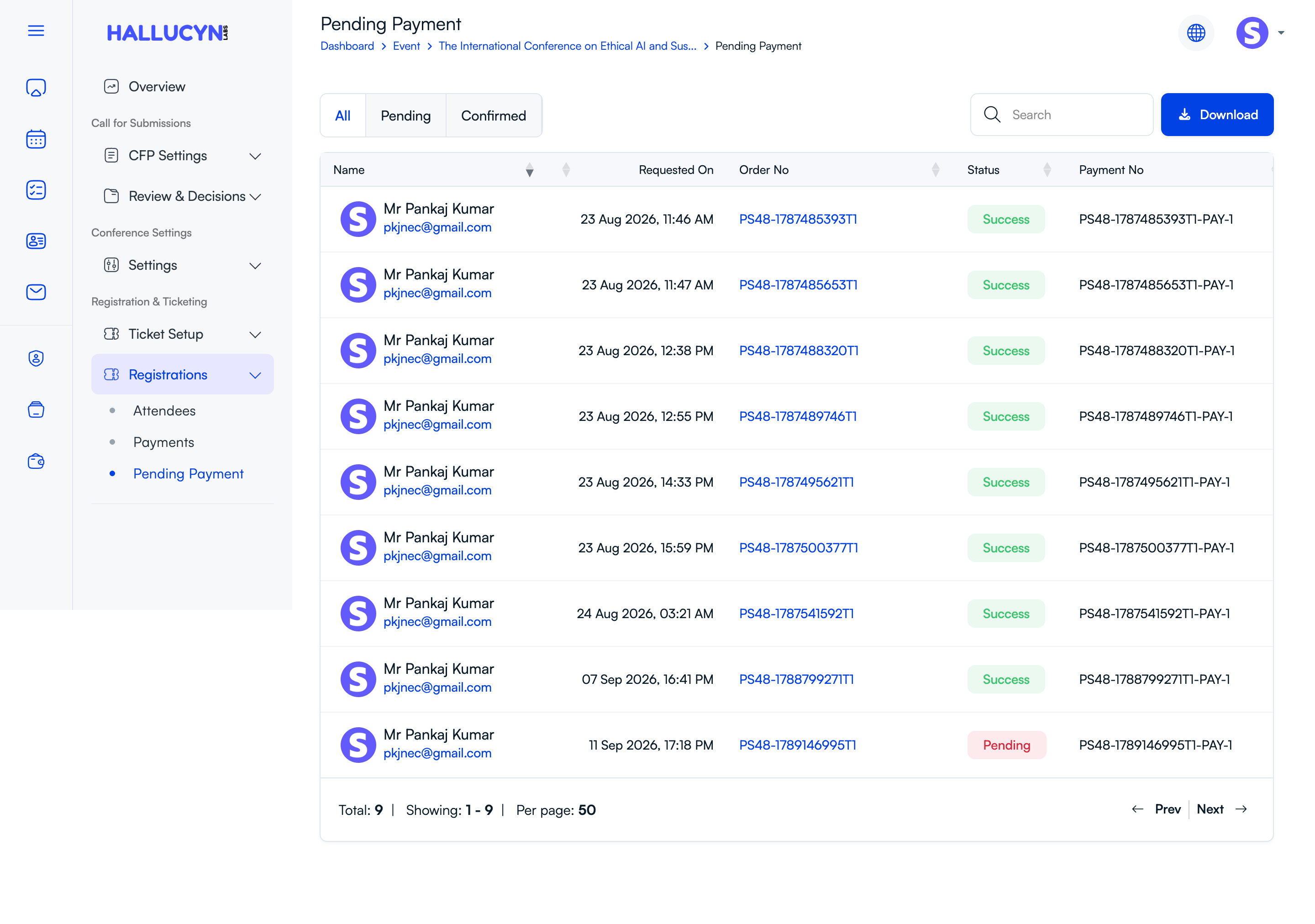
The pending-payment dashboard shows payment requests with their order number, payment number, date, and status. Staff can filter pending and confirmed entries, search for an order, and download the list for reconciliation. This is especially useful when the university receives a direct bank transfer and its finance team must verify it before the ticket is released.
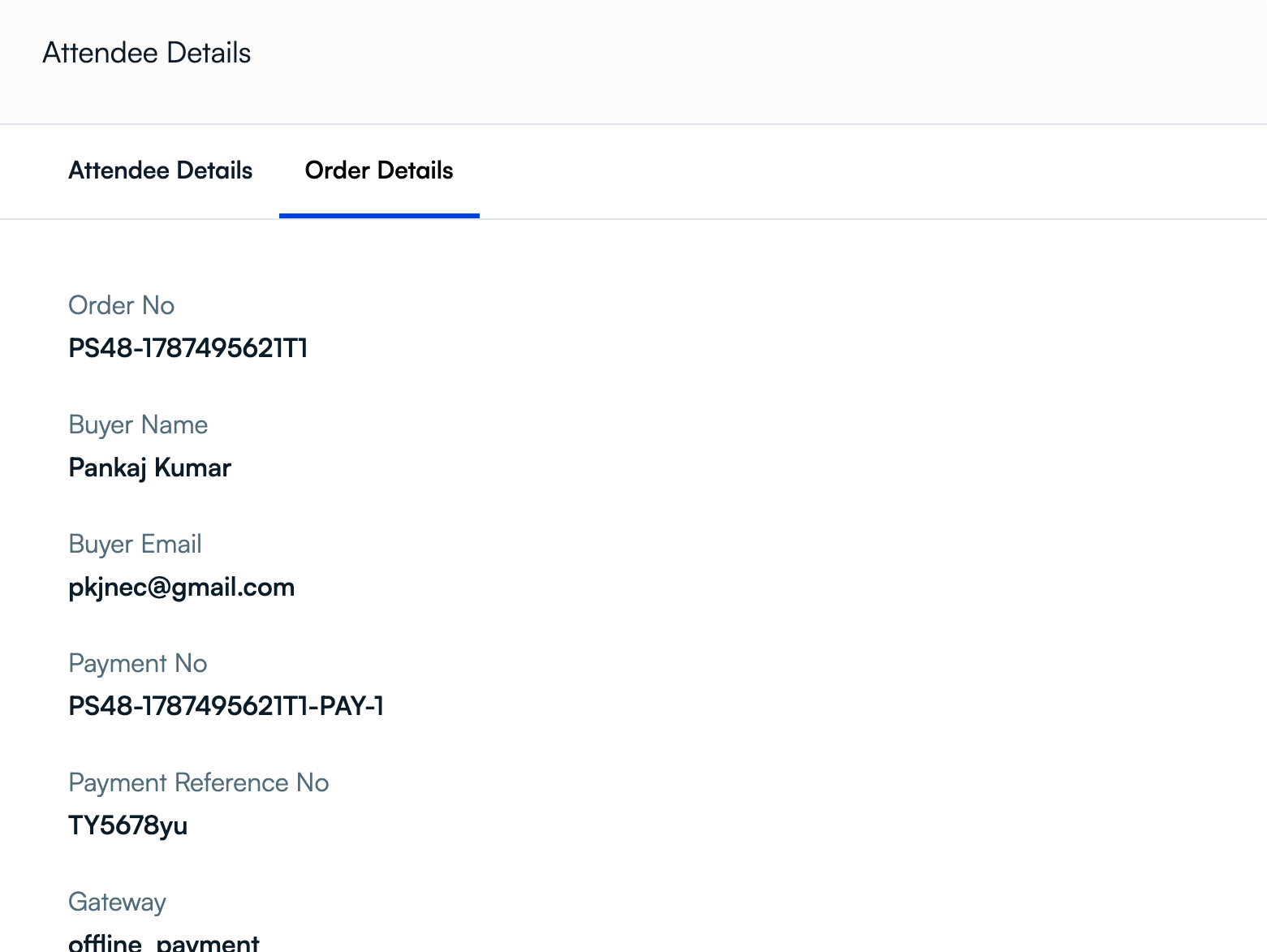
Opening the attendee's order reveals the buyer and payment details, including the reference number and gateway. These fields help the team match an attendee's payment information with the funds received. After verification, the organizer confirms the pending payment in PeerSubmit, which marks the order successful and creates the attendee record.
Best fit: research conferences whose finance team wants the option to collect funds directly and approve registration only after verification. If online checkout is required, confirm the connected gateway and MXN flow before launch.
University teams can also use our university-specific registration guide to evaluate the full author, ticket, and finance workflow.
2. Ex Ordo — for scholarly presenter payment tracking
Ex Ordo links scholarly submissions with delegate registration and shows which presenters have paid. Its published registration features include custom fees, workshops, card payments through Stripe or PayPal, and bank transfers.
Best fit: organizers who need presenter-specific payment follow-up and a shared scholarly event account. Confirm local currency and payment availability for your chosen setup.
3. ConfTool Pro — for complex participant and invoice rules
ConfTool Pro lets organizers define participant groups, time discounts, event items, tax settings, invoices, and payment choices. Its documentation explains both online payments and organizer confirmation of offline payments.
Best fit: academic events with many pricing categories or invoice requirements. Budget time to test each category and payment route.
4. Cvent — for large conference operations
Cvent combines branded registration, payments, reporting, CRM integrations, and broader conference operations. It is a stronger candidate when marketing and on-site management are major parts of the project.
Best fit: large event teams that need an enterprise event system. Request a proposal showing the exact payment configuration and total cost for a Mexico-based conference.
5. Whova — for ticketing and attendee engagement
Whova offers ticket categories, discount codes, custom registration questions, and connected app, badge, and check-in tools. It is useful when the attendee experience is a leading requirement.
Best fit: events that need registration plus an attendee app. If paper review is central, demonstrate its submission workflow alongside its ticketing flow.
A Mexico-specific test before you choose
Create a sample conference with a student ticket in MXN and a presenter ticket. Register one delegate with an online method and another with direct-payment instructions. Confirm that the second registration stays pending until your team verifies the funds, and check the confirmation email, ticket, attendee list, and payment report after approval. This test reveals more than a feature checklist.
Final thoughts
The right conference management software for Mexico should fit your institution's payment process as well as its event program. PeerSubmit is especially relevant to academic organizers who want submissions, peer review, registration, and a choice between supported online payments and organizer-verified direct payments. Compare Ex Ordo and ConfTool Pro for other scholarly workflows, and Cvent or Whova when broader event operations take priority.
Start Running Your Conference—From Submission to Decision
Join hundreds of organizers who trust PeerSubmit to manage their academic events with AI-powered efficiency and seamless workflows.
No credit card required • Setup in minutes
Conference Registration in Mexico FAQs
Run Your Conference Without the Chaos
Manage submissions, peer review, registrations, and event workflows—all in one platform built for academic conferences.
Join hundreds of academic conferences already using PeerSubmitNo credit card required • Setup in minutes