PeerSubmit October 2026 Update: Conference Ticketing, Multi-Currency Payments & Attendee Management

Paige Watson
Published on 26 October 2026The PeerSubmit October 2026 Update introduces a complete conference ticketing software workflow for academic and professional events. Organizers can now create ticket categories in supported currencies, publish a ticket sales experience, collect attendee information, offer Stripe, PayPal, or organizer-confirmed bank deposit payments, manage orders and attendees, create discount codes, and download registration records.
Ticketing extends the academic workflow already available in PeerSubmit. A university conference can collect abstracts, coordinate peer review, make decisions, publish its event page, sell student and regular tickets, and track registrations without rebuilding the conference in a separate generic ticketing system.

October 2026 Update at a glance
| Feature | Organizer benefit | Typical use case |
|---|---|---|
| Multi-currency ticket setup | Define the price and currency displayed for each ticket category | Offer student, presenter, member, or general tickets for an international conference |
| Event, ticket sales, and checkout pages | Guide visitors from conference information to ticket selection and payment | Promote a symposium and give delegates a clear registration route |
| Stripe, PayPal, and bank deposit | Offer configured online methods or an organizer-verified direct payment process | Serve card or PayPal users while allowing institutional deposits |
| Discount codes | Run controlled promotions by ticket, value, quantity, and validity period | Early-bird, student, member, invited-speaker, or outreach campaigns |
| Attendee management | Search, filter, inspect, confirm, or cancel attendee records | Prepare a final participant list by registration status and ticket type |
| Dynamic registration forms | Attach a questionnaire to a specific ticket category | Collect different details from students, speakers, or workshop attendees |
| Order and payment management | Review completed orders and trace payments using order and payment references | Answer an attendee query or reconcile a payment with finance |
| CSV downloads | Download attendee, completed-payment, and pending-payment records | Create operational lists, reconcile accounts, or report to a university |
Conference ticketing software with multi-currency setup
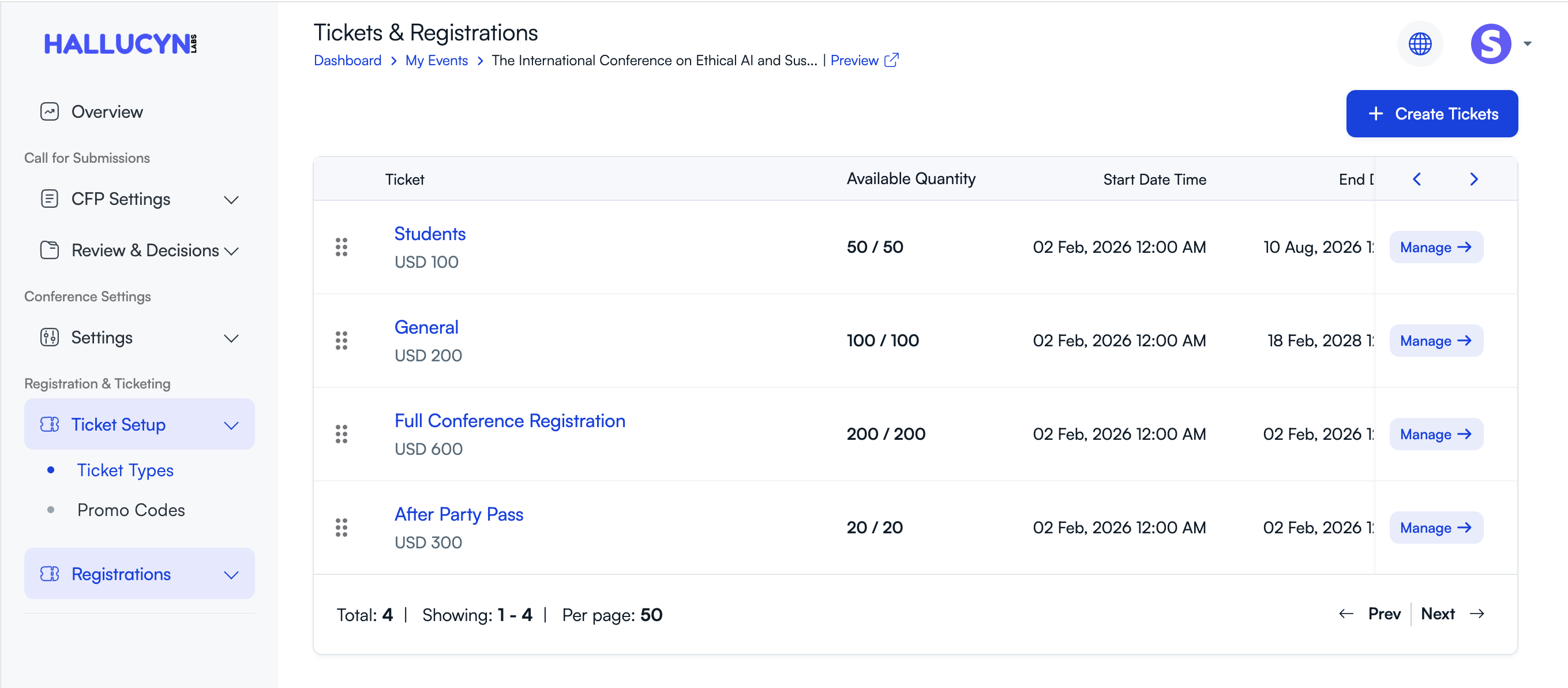
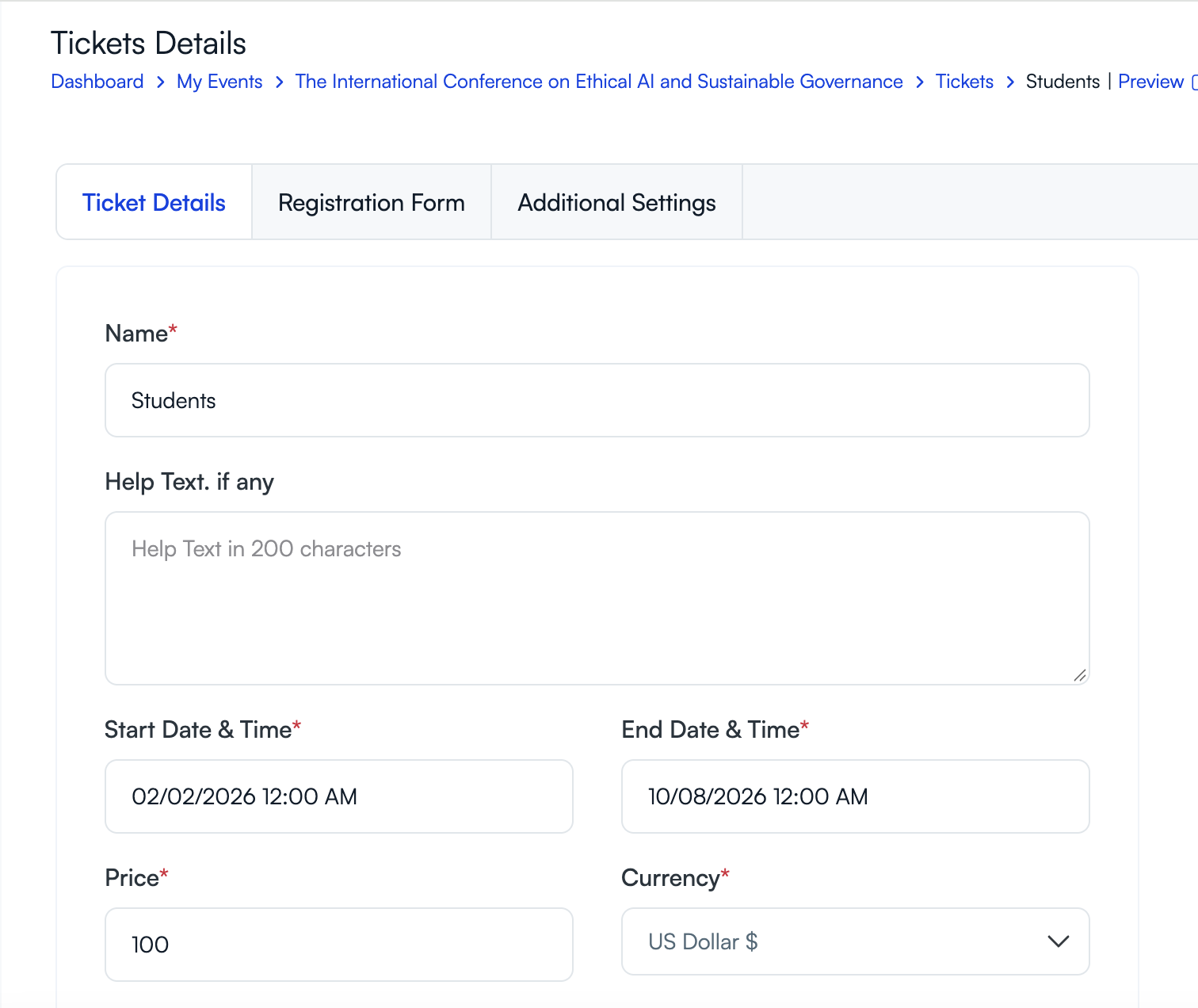
Each PeerSubmit ticket has its own name, price, currency, quantity, sales start and end time, and status. Organizers can create categories such as Students, Presenters, General Admission, Full Conference, Workshop, or Social Event. They can keep a ticket in draft, publish it as live, or pause it when sales need to stop temporarily.
The currency selector includes a broad list of currencies, including USD, MXN, VND, SGD, and INR. This gives the organizer control over how a ticket is priced. It does not mean that every configured gateway accepts every currency, and it does not promise automatic currency conversion. Before sales open, the team should verify that its chosen Stripe or PayPal account supports the ticket currency, settlement country, attendee location, and transaction type.
Consider an international research conference hosted in Singapore. The organizer may create student and general tickets in SGD and invite participants from India, Vietnam, Mexico, and other countries. The public page can show the selected SGD prices, while the organizer tests overseas checkout with the configured gateway. If the institution also accepts deposits into an approved account, it can provide that route separately and verify each deposit before confirmation.
Create and control each ticket category
The ticket details screen lets the organizer set the category name, optional help text, sales window, price, currency, and total quantity. Additional settings support minimum and maximum quantities shown to a buyer, ticket status, optional tax information, additional charges, and wait-list settings where configured. The organizer should use these controls to reflect its real registration policy rather than publishing one generic ticket for every delegate.
Event pages, ticket sales, and checkout serve different jobs
A strong registration experience separates information, selection, and payment. PeerSubmit's public conference presence can give each stage a clear purpose:
- Conference event page: explains the event's purpose, dates, venue or delivery format, organizers, and other public information. This is where a prospective delegate decides whether the conference is relevant.
- Ticket sales page: presents the live ticket categories, prices, availability, and registration deadlines. A delegate chooses the appropriate category and quantity.
- Checkout and attendee forms: collect buyer and attendee information, apply an eligible promotional code, show the order summary, and direct the buyer to an available payment method.
This distinction matters for academic conferences. The public event page may promote keynote speakers and research themes, while the sales page distinguishes student, faculty, presenter, member, workshop, and general rates. The checkout then gathers the details required for the selected category and records the resulting order.
The sales experience also supports free tickets. A departmental seminar can create a zero-cost registration category to collect a reliable attendee list without requiring payment. Paid and free orders remain visible to organizers in the relevant registration and payment views.
Stripe, PayPal, and organizer-confirmed bank deposits
The October 2026 Update supports three payment paths highlighted for conference registration: Stripe, PayPal, and offline payment instructions for a bank deposit or another approved direct-payment process. Organizers decide which configured options are offered. Availability depends on the organizer's payment account, country, gateway eligibility, currency, and transaction settings.
Stripe
When Stripe is configured and active for the organizer, an attendee can choose it during payment. A successful payment releases the order and creates the attendee record. The conference team should test the actual ticket currency, card types, settlement destination, receipts, refunds, and any institutional finance requirements before promoting the option.
PayPal
A configured PayPal account can provide a second online route. As with Stripe, the organizer must confirm current account and currency eligibility. PeerSubmit presents only active payment options, so the public checkout reflects the conference's configured setup.
Bank deposit with organizer confirmation
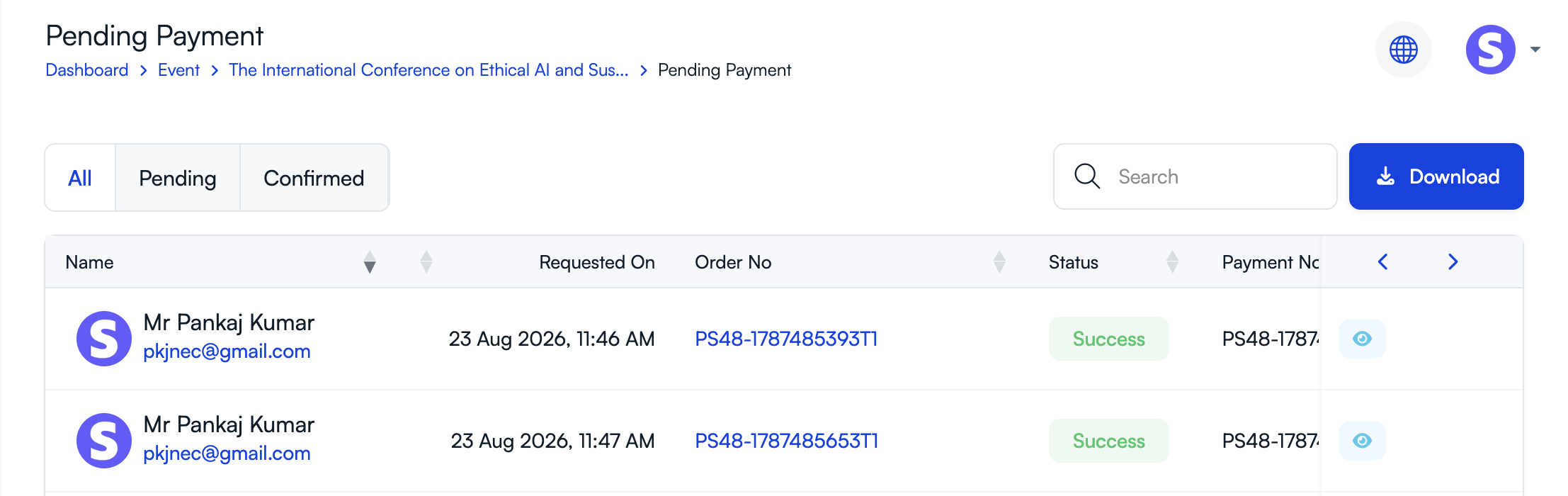
The offline-payment workflow is deliberately different from an online gateway. PeerSubmit displays the organizer's payment instructions. The attendee makes the bank deposit or transfer directly to the university, institution, association, organizer, or designated merchant account and submits the payment request. The request stays pending; it is not treated as paid merely because the attendee selected the option.
Registration or finance staff review the payment request, order number, payment number, buyer, reference, and any additional information. They can confirm the payment after matching the funds, or decline a pending request when it cannot be verified. Confirmation changes the payment and order to successful, creates the attendee record, and sends the payment-confirmed notification. This gives the receiving organization control over when a ticket is released.
Discount codes for early-bird, student, and special registration
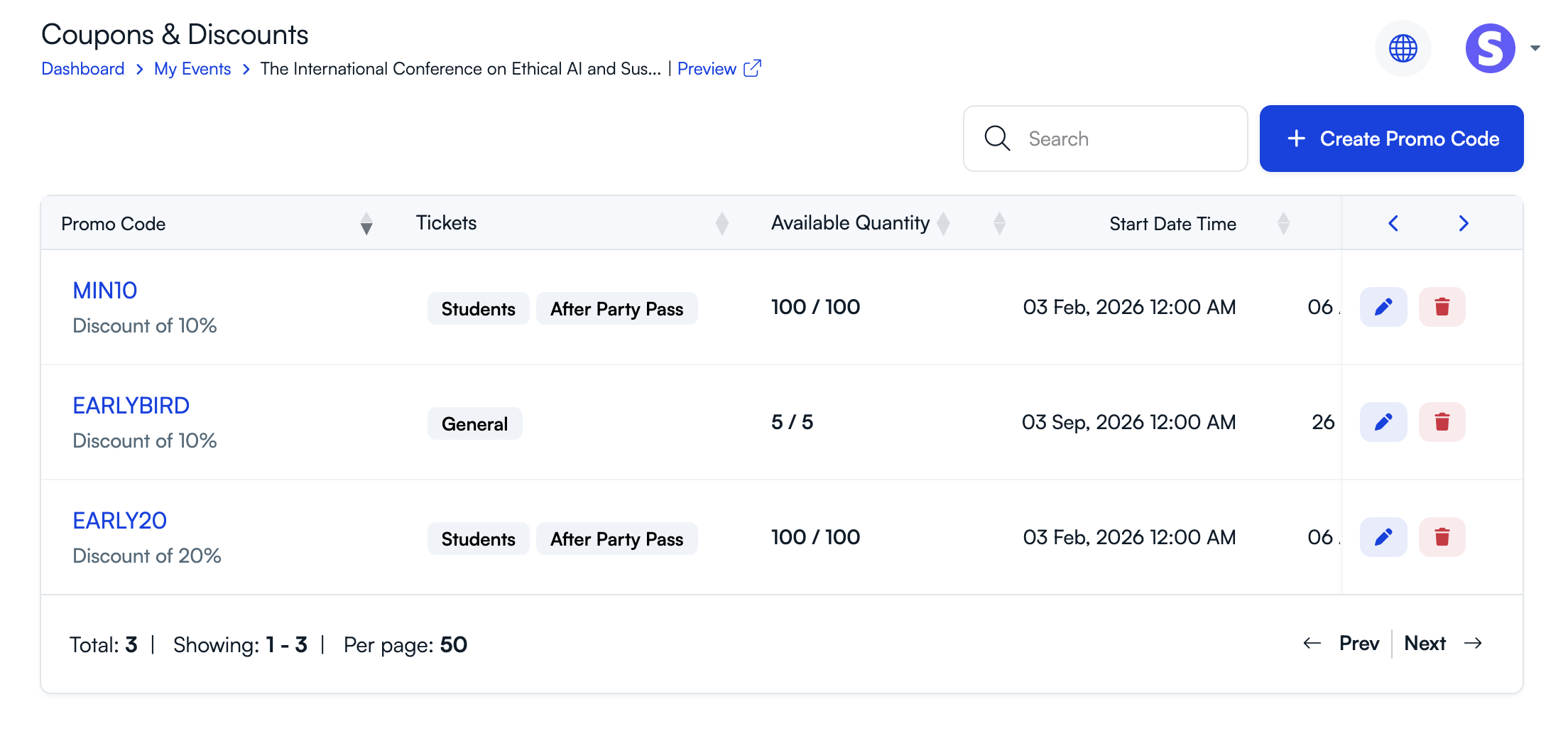
PeerSubmit lets organizers create as many promotional-code records as their event requires. Each code can use a fixed amount or percentage discount, a usage limit, one or more applicable tickets, a start and end date, optional public visibility on the registration page, and help text.
These controls support several practical academic use cases:
- Early-bird registration: create a date-limited percentage discount for the general or full-conference ticket.
- Student campaign: apply a controlled discount only to student tickets and limit total uses.
- Association members: distribute a private code to eligible members rather than making it visible publicly.
- Invited participants: use a fixed or percentage code for invited speakers, reviewers, or partners when the organizer's policy allows it.
- Outreach promotion: give a partner organization its own code with a defined validity period and ticket scope.
The code list shows applicable tickets, available quantity, validity period, and status. This is more controlled than manually editing prices or issuing informal exceptions after payment.
Attendee management and dynamic registration forms
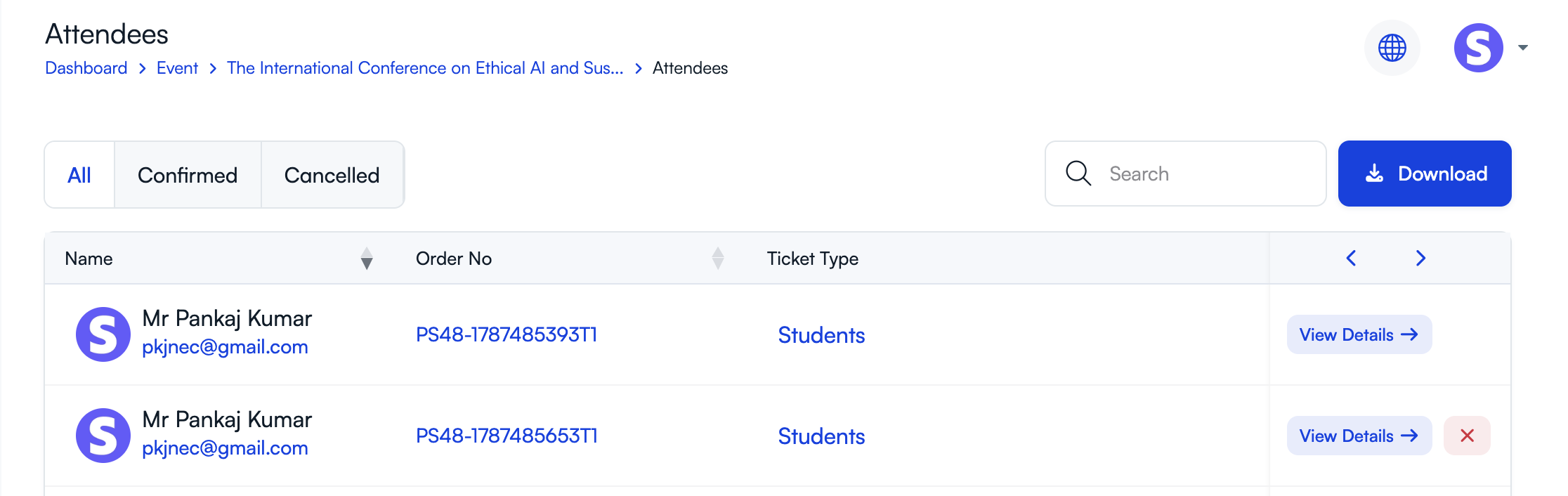
A paid order is useful only when the organizer can identify the people attending. PeerSubmit maintains a centralized attendee list with name, order number, ticket type, and status. Staff can search records, filter confirmed or cancelled attendees, open an attendee's details, and cancel an active registration. Cancellation is recorded with its time and the responsible account, and a cancellation notification is sent.
The attendee record can also show its order, payment, and answers from the form attached to the ticket. This gives the team a single place to answer questions such as: Which ticket did this person buy? Is the attendee confirmed or cancelled? What information did they provide during registration?
Collect different information for different tickets
Every ticket can be connected to a configurable questionnaire form. This lets an organizer collect information appropriate to the category rather than forcing every attendee through the same fields. Depending on the form the organizer creates, examples could include name, affiliation, country, badge name, dietary preference, accessibility request, student status, workshop choice, or presentation-related details.
Those are examples of fields the organizer may configure, not a claim that every event receives them automatically. The team designs or selects the form, attaches it to the ticket, and decides what is required. A student ticket can request institutional and student-status information, while a workshop ticket can ask about the selected session or prerequisite experience.
Order management and downloadable conference records
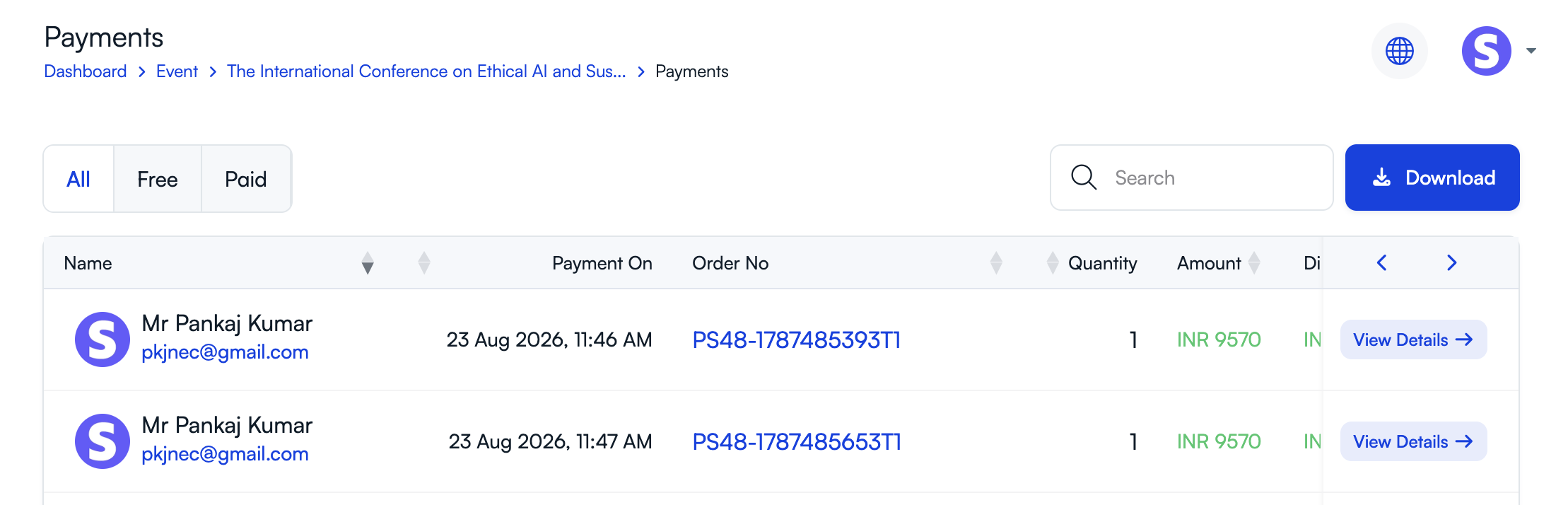
The Payments area gives organizers a completed-order view with All, Free, and Paid filters. Records include the buyer, payment date, order number, quantity, amount, discount information where applicable, and a details action. Opening an order provides its cart, payment, and attendee records, including gateway and reference data when present.
This view helps staff handle ordinary conference questions. When a delegate quotes an order number, the organizer can inspect the purchase rather than searching through emails. When finance needs to match a transaction, staff can use the payment number, gateway reference, buyer, amount, currency, and payment dates stored with the order.
Download records as CSV
The Download action exports CSV records. PeerSubmit provides separate downloads for attendee records, completed payment or order records, and pending offline-payment records. The attendee export includes standard identity, contact, ticket, status, and order fields, plus values collected through the attached ticket form where available. Payment exports contain order and payment information used by the organizer's registration view.
CSV downloads help a conference team prepare badge or attendance lists, coordinate catering and workshops, reconcile deposits, share authorized reports with a university, and preserve an operational record. Because exported files may contain personal and payment-related information, organizers should limit access and handle them under the institution's privacy and retention policy.
The complete PeerSubmit workflow: submission to ticket sale
PeerSubmit remains an academic conference platform rather than only a ticket seller. The new ticketing workflow sits beside the existing capabilities described on the conference software and conference solutions pages.
1. Publish the call for papers
Organizers create a public conference and submission page, configure tracks and topics, define submission types and deadlines, and build structured author and submission forms. PeerSubmit can collect abstracts, full papers, panels, posters, manuscripts, multiple authors, affiliations, keywords, and files according to the configured workflow. Authors can track their submissions and respond to revision requests before the relevant deadline. See the abstract management software overview for the broader submission workflow.
2. Coordinate peer review
Program chairs manage reviewer invitations, assignments, workload, criteria, scores, comments, and progress. PeerSubmit supports configurable review forms and single-blind, double-blind, or open workflows where enabled by the event. Chairs can monitor incomplete reviews, send reminders, request revisions, and keep review activity within the conference workspace. The peer review software page and peer review help center explain these operations in more detail.
3. Make decisions with human oversight
PeerSubmit's optional AI features can recommend reviewers, generate submission summaries, assist evaluation, and produce decision-oriented insights based on available submission and review information. AI output supports the committee; it does not replace academic judgment. Chairs remain responsible for conflicts, reviewer selection, interpretation of feedback, and the final accept, reject, or revision decision. Learn more on the AI automation page.
4. Open registration and sell tickets
After or alongside the academic process, the organizer creates ticket categories, attaches attendee forms, publishes the public sales page, activates eligible payments, and offers controlled discounts. Accepted authors can be directed to the relevant presenter ticket, while non-presenting delegates choose student, member, general, workshop, or other categories defined by the event.
5. Communicate and operate the event
Conference teams can use templates, notifications, and email campaigns for author, reviewer, decision, payment, and attendee communication. Team access and role-based permissions let organizers, chairs, reviewers, and other collaborators work in the appropriate areas. Registration, attendee, payment, and submission downloads support program preparation and event-day logistics.
How AI helps the academic team before registration opens
Ticketing is most valuable when the accepted program is ready on time. AI-assisted reviewer recommendations can help chairs identify reviewers whose expertise aligns with a submission. The chair reviews candidates, workload, and conflicts before making the assignment.
AI-generated submission summaries can help reviewers and chairs understand the topic, method, and claimed contribution more quickly. Where enabled, quality or scope signals and decision-support outputs can bring attention to issues or synthesize review evidence. These outputs are advisory. Human reviewers evaluate the work, and authorized academic leaders make the final decision.
That academic continuity matters operationally. When decisions are completed in the same platform that manages registration, the committee has a clearer route from accepted paper to confirmed presenter. It can communicate the result, request a final revision if needed, provide the correct ticket instructions, and monitor registration progress without exporting the conference into another system too early.
Four practical conference use cases
University department conference
A department collects abstracts, assigns faculty reviewers, accepts oral and poster presentations, creates student and faculty tickets, attaches different registration forms, and accepts supported online payments or verified deposits. CSV exports provide the department with attendee and finance records.
Academic society annual meeting
A society runs multiple tracks, manages a distributed reviewer committee, creates member and non-member tickets, publishes an early-bird code, and uses payment and attendee lists to prepare the meeting. Invited participants can receive a private code under the society's policy.
Research institute symposium
An institute accepts full papers and posters, uses a double-blind review, issues revision decisions, offers free registration for internal attendees and paid registration for external delegates, and separates free and paid orders in the organizer dashboard.
International academic conference
An international event publishes a public conference page, configures tickets in its selected currency, collects country and affiliation through ticket-specific forms, and offers available payment routes. The organizer tests international checkout and keeps deposit requests pending until finance verifies the funds.
Regional considerations for Mexico, Vietnam, Singapore, and India
The platform workflow is global, but payment and registration decisions remain local. Organizers should test the configured gateway, currency, settlement account, attendee instructions, invoices or tax records, refunds, and institutional approval process for the event's country.
- Mexico: consider Spanish-language attendee communication, MXN ticket setup, student and presenter rates, and direct deposits received by the institution. A deposit must remain pending until verified. See our Mexico registration guide.
- Vietnam: test VND display, names and affiliations, attendee form requirements, and the administrative process for verifying direct bank payments. See the Vietnam registration guide.
- Singapore: consider SGD pricing, international delegates, overseas card testing, institutional procurement, and organizer-confirmed direct payments. See the Singapore registration guide.
- India: model student, research scholar, faculty, presenter, and industry tickets; test INR and the connected gateway; and verify any direct deposit before release. See the India registration guide.
These examples do not mean Stripe, PayPal, a particular currency, or a specific banking method is available to every organizer in every country. Eligibility depends on the configured payment account and provider rules. Separate Spanish and country-focused articles can address local search intent more fully than putting every regional term into the main product page.
Checklist for choosing conference registration software
- Create every real ticket category, currency, capacity, sales window, and registration form.
- Complete free, paid, discounted, and direct-deposit test orders.
- Verify the exact currencies and transactions supported by the connected Stripe or PayPal account.
- Confirm that an offline payment stays pending until an authorized organizer verifies it.
- Inspect attendee details, cancel a test registration, and confirm the resulting status and notification.
- Download attendee, completed-payment, and pending-payment CSV files and check every required field.
- Run an abstract through submission, reviewer assignment, review, revision, decision, and presenter registration.
- Review access permissions, privacy, retention, finance, procurement, and support requirements.
- Check current plans and included limits on the pricing page.
- Use a personalized demo or create an account to test the workflow with your event structure.
Build one connected academic conference workflow
The October 2026 Update gives academic organizers a practical route from research content to confirmed attendance. PeerSubmit now connects public event information, ticket categories, dynamic forms, discounts, configured online payments, organizer-confirmed deposits, orders, attendees, and CSV records with abstract management, peer review, AI assistance, decisions, communication, and team access.
The result is a conference workflow in which ticketing supports the academic program instead of operating as an isolated sales tool. Organizers can start with an account or book a demo to test their submission, review, registration, and payment process before opening it to participants.
Start Running Your Conference—From Submission to Decision
Join hundreds of organizers who trust PeerSubmit to manage their academic events with AI-powered efficiency and seamless workflows.
No credit card required • Setup in minutes
October 2026 Conference Ticketing Update FAQs
Run Your Conference Without the Chaos
Manage submissions, peer review, registrations, and event workflows—all in one platform built for academic conferences.
Join hundreds of academic conferences already using PeerSubmitNo credit card required • Setup in minutes