How do reviewers submit their reviews?

Paige Watson
Updated on 10 March 2026Reviewers evaluate assigned research papers and provide feedback through the PeerSubmit review system. The platform provides a structured review workflow that allows reviewers to read manuscripts, evaluate them using scoring criteria, and submit their final recommendations.
The review process helps conference organizers assess the quality, originality, and impact of submitted research before making final acceptance decisions.

Step 1: Log in to Your Reviewer Account
Reviewers first need to log in to their PeerSubmit account using the credentials provided by the conference organizers.
- Open the PeerSubmit login page.
- Enter your email address and password.
- Click Login to access your dashboard.
Once logged in, you will be able to access the conferences where you are assigned as a reviewer.

Step 2: Select the Conference or Organization
If you are associated with multiple organizations or conferences, you may need to choose the correct account to access reviewer assignments.
- Select the organization or conference you are reviewing for.
- Click the arrow to enter the reviewer dashboard.
This will open the conference workspace where you can view assigned submissions.

Step 3: View Assigned Submissions
Inside the conference dashboard, reviewers can see a list of submissions assigned to them.
- Navigate to the Submissions section.
- Review the list of assigned papers.
- Click View Submission to open a paper.
Each submission includes manuscript details, abstract, keywords, and uploaded files.

Step 4: Review the Manuscript
Before submitting your evaluation, carefully review the manuscript and submission details.
- Read the manuscript and supporting documents.
- Check the research methodology and technical quality.
- Evaluate the originality and relevance of the research.
After reviewing the paper, you can submit your evaluation using the review form.
Step 5: Submit the Review
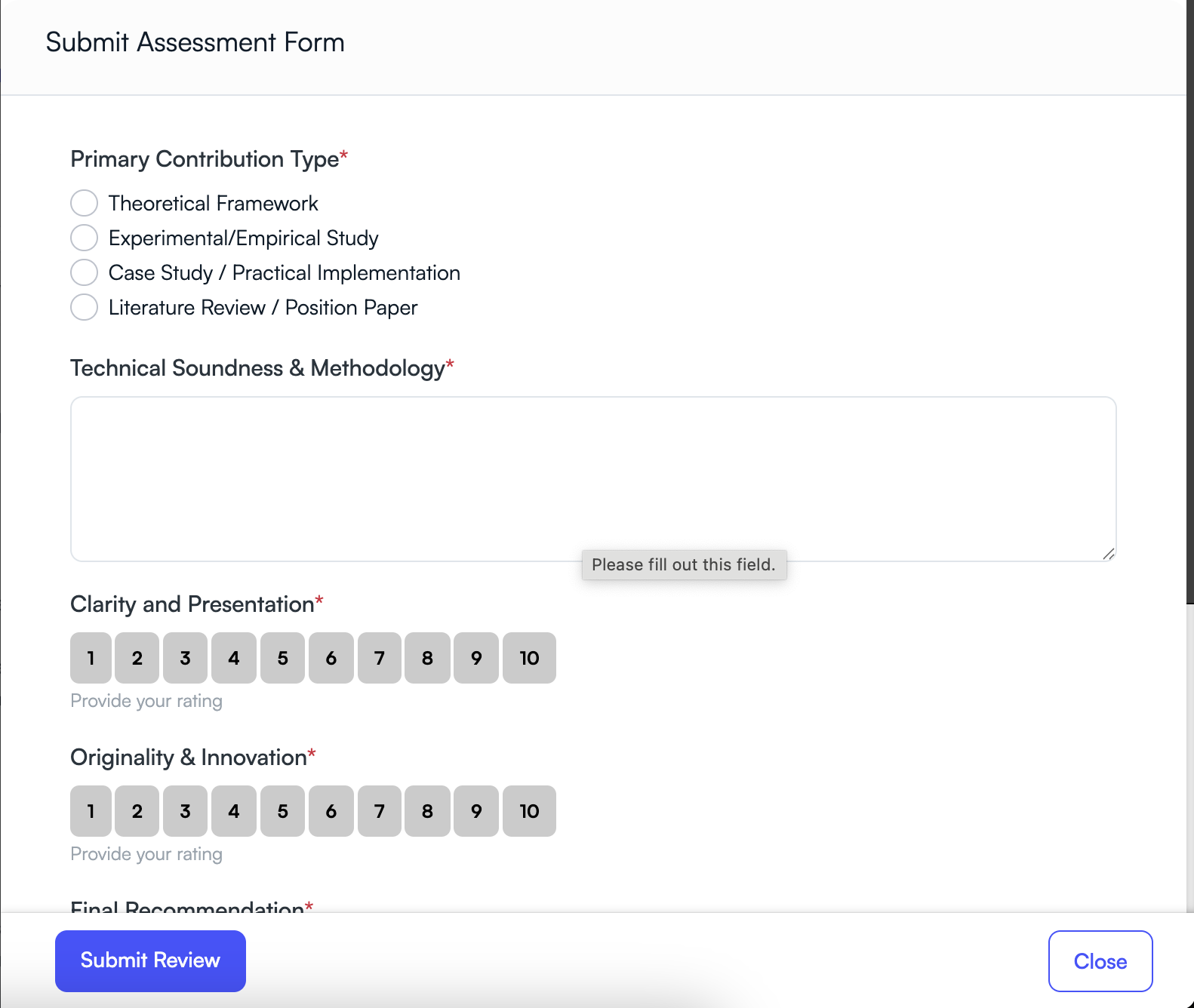
Click the Submit Review button to open the assessment form. The form allows reviewers to evaluate submissions using structured criteria.
- Select the primary contribution type.
- Provide feedback on technical methodology.
- Rate clarity, originality, and innovation.
- Choose a final recommendation.
After completing the evaluation form, click Submit Review to finalize your review.
Tips for Writing Effective Reviews
- Provide constructive feedback that helps authors improve their work.
- Be objective and avoid personal bias.
- Support your evaluation with clear reasoning.
- Submit your review before the deadline.
Thoughtful reviews help maintain the academic quality of the conference and improve the research presented.
Next Step
After all reviews are submitted, program chairs analyze reviewer feedback and make final decisions on whether submissions are accepted, rejected, or require revision.
Related Articles
Start Running Your Conference—From Submission to Decision
Join hundreds of organizers who trust PeerSubmit to manage their academic events with AI-powered efficiency and seamless workflows.
No credit card required • Setup in minutes
Run Your Conference Without the Chaos
Manage submissions, peer review, registrations, and event workflows—all in one platform built for academic conferences.
Join hundreds of academic conferences already using PeerSubmitNo credit card required • Setup in minutes